Overview
You will build a professional-grade Smart Audio Interface using just one button and a buzzer with the RGX Kit. Instead of using multiple buttons for different notes, you will program a single button to recognize different patterns—single press, double press, and long press—to trigger different musical responses.
Objectives
•
How to generate sound using a buzzer
•
How different frequencies create different musical notes
•
Understand how one digital input can perform multiple functions.
•
Master frequency control and timing logic.
•
Learn how to program "Interaction Patterns" (Press, Double Press, Long Press)
Meet the Components
You will use:
•
Button Module 1
•
Buzzer Module
•
RGX Control Board
•
RJ11 Easy-Plug Cables
Hardware Connections
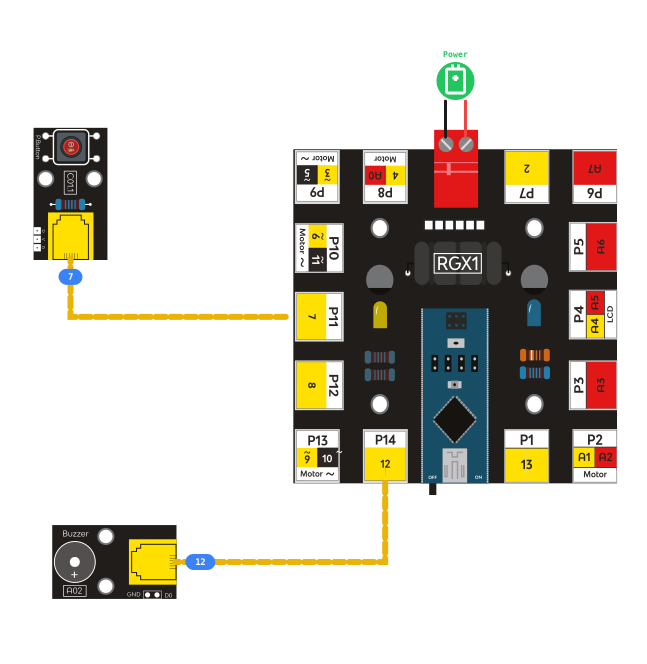
Component | PIN Connection |
Button 1 | Digital PIN 7 |
Buzzer | PIN 12 |
Make sure all connections are secure using RJ11 cables.
How the System Works
Behavior:
•
Single Press → buzzer plays
NOTE_C3 •
Double Press → buzzer plays a high-pitched melody (
NOTE_C5 & NOTE_E5)•
Long Press (Hold for 1s) → buzzer plays
NOTE_A4•
Release button → sound stops This creates a simple yet intelligent piano-like system.
Coding the System
Multifunctional Block: The 3-in-1 Interaction System
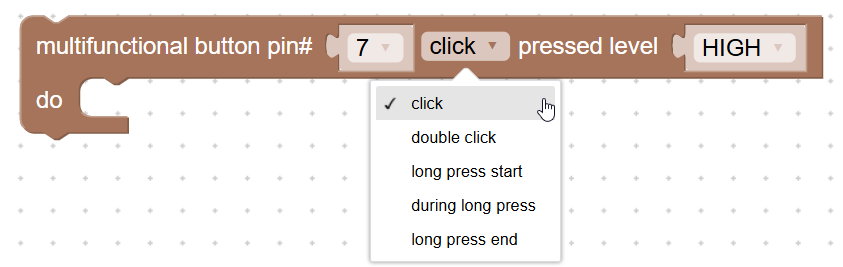
Multifunctional Block
The system checks the button and plays a specific note or melody based on how you interact with it.
Step 1: Single Press - Play NOTE_C3
Actions: Play sound on buzzer Tone PIN# (12) frequency (NOTE_C3). You can find the Tone block in the Actuator category. Look for the block “Tone PIN# frequency” and select the note
NOTE_C3 from the frequency list
Single Press
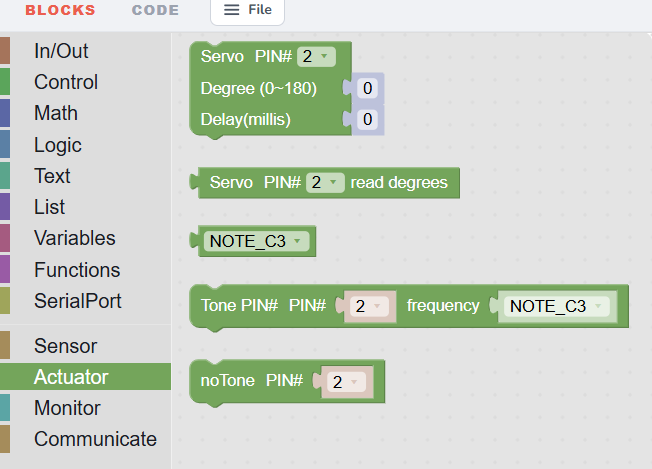
Sound Category with Tone Blocks
The Tone block allows you to choose different musical notes, such as:
NOTE_C3, NOTE_D3, NOTE_E3, NOTE_F3, NOTE_G3, NOTE_A3, NOTE_B3
Each note produces a different sound frequency, just like a real piano.
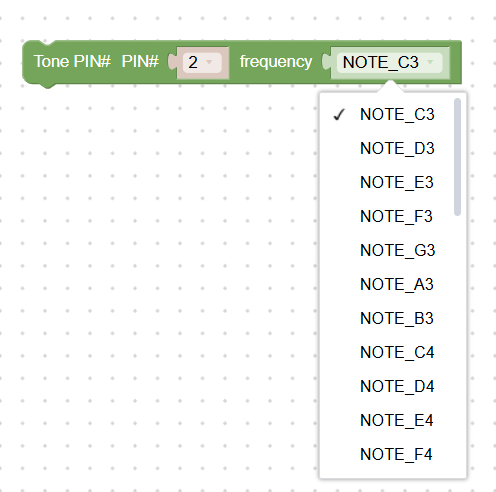
the note selection
When the button is pressed, the buzzer plays NOTE_C3.
Step 2: Double Press—Play High Melody
Actions: Detect two quick presses and play sound on buzzer tone PIN# (12) frequency
NOTE_C5 then NOTE_E5. This triggers a brighter, higher melody than the single press.
Double Press
Step 3: Long Press - Play NOTE_A4
Actions: Detect if the button is held and play sound on buzzer tone PIN# (12) frequency (
NOTE_A4). If the button stays HIGH for more than 1 second, the buzzer plays a continuous note at 440 Hz.Step 4: Button Released
Actions: Stop sound, no tone, PIN#, PIN# (12)
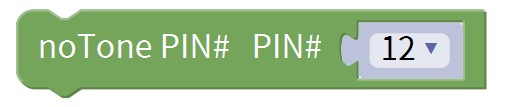
notone block
When the button is released, the sound stops.
Test Your System
Power the RGX board and test the patterns:
1.
Press Once → hear
NOTE_C3. 2.
Press Twice Fast → hear the high melody.
3.
Hold Button → hear
NOTE_A4. 4.
Release → sound stops.
If this happens, your system is working correctly!
Improve & Extend
Try upgrading:
•
Add more buttons for more notes Create a full musical scale. Play melodies automatically
•
Add an LCD to show the note name
•
Visual Feedback: Make an LED blink different patterns for each type of press.